
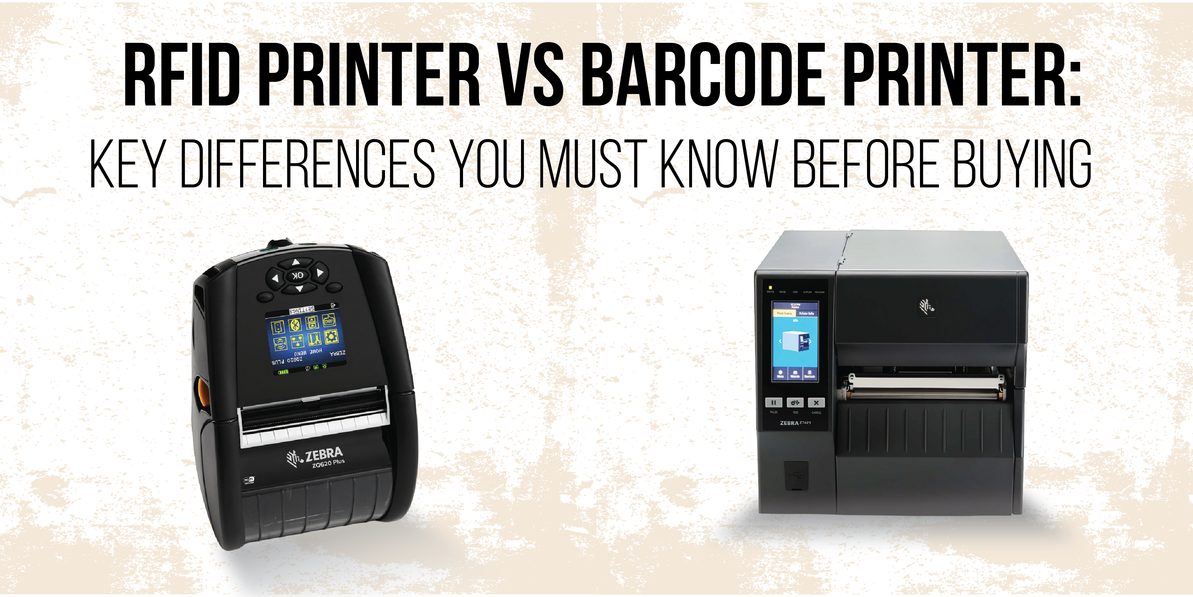
RFID Printer vs Barcode Printer: Key Differences to Know
Introduction
In today’s fast-paced business environment, keeping track of assets and inventory is essential. Two common tools that help with this are barcode printers and RFID printers. Both are used to label items, but they work in different ways. Barcode printers create labels that can be scanned visually, while RFID printers add data to smart tags that can be read using radio signals.
Because of these differences, many businesses compare the two to see which option best fits their needs. This guide will walk you through the key differences so you can make an informed decision about which printer is right for your operations.
Understanding the Basics
What is a barcode printer?
A barcode printer is designed to print machine-readable codes that represent information.
- How it works: It prints black-and-white patterns (bars and spaces) that scanners read.
- Types:
- Thermal transfer: Uses a ribbon to transfer ink onto labels.
- Direct thermal: Uses heat-sensitive paper, no ribbon required.
- Use cases: Widely used in retail for product labels, logistics for shipment tracking, and healthcare for patient wristbands.
What is an RFID printer?
An RFID printer not only prints labels but also encodes data onto an embedded RFID chip.
- How it works: It writes information into the chip while printing the label.
- Use cases: Common in manufacturing for work-in-progress tracking, supply chain for bulk shipment management, and asset tracking in industries like IT and healthcare.
Core Differences Between RFID and Barcode
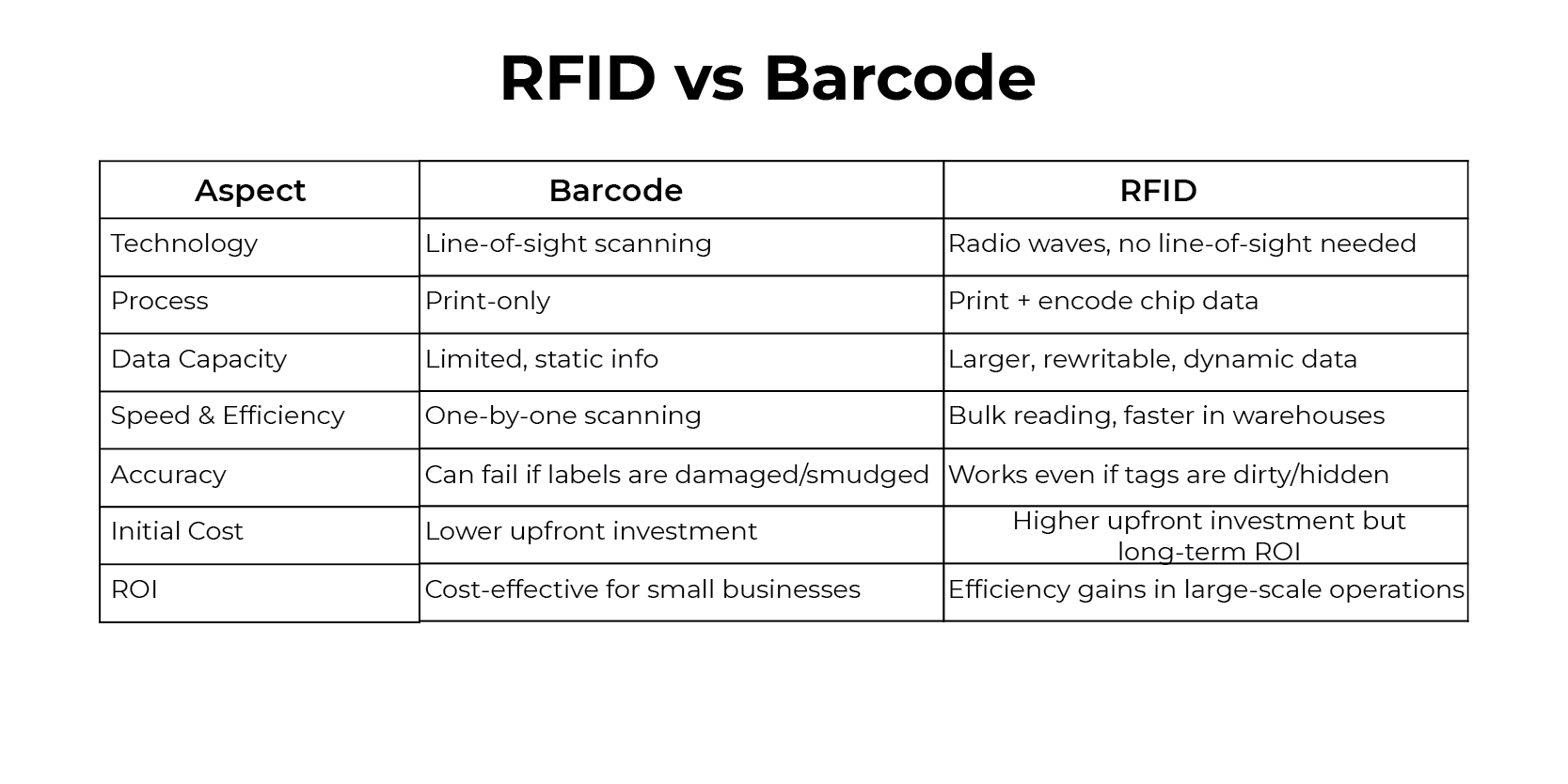
| Aspect | Barcode | RFID |
| Technology | Requires line-of-sight scanning; limited to visual codes. | Uses radio waves; no line-of-sight needed, enabling faster and more flexible reads. |
| Printing & Encoding | Print-only; cannot store or update data. | Prints labels and encodes chip data simultaneously for smarter tracking. |
| Data Capacity |
Limited, static information; cannot be changed once printed. |
Larger storage, rewritable and dynamic, supports detailed item-level data. |
| Speed & Efficiency | One-by-one scanning; slower in bulk operations. | Bulk reading of multiple items at once;ideal for warehouses and logistics. |
| Accuracy & Reliability | Can fail if labels are damaged, smudged, or poorly printed. | More resilient; works even if tags are dirty, hidden, or exposed to wear. |
| Initial Cost | Lower upfront investment; affordable for small businesses. | Higher upfront cost; requires RFID-enabled infrastructure. |
| Consumables | Inexpensive labels; widely available. | RFID tags are costlier but durable and reusable in some cases. |
| ROI | Cost-effective for small-scale operations. | Efficiency gains in large-scale operations; reduces errors and labor costs. |
| Integration | Easy to integrate with existing barcode scanners and POS systems. | Requires RFID readers/software but integrates well with modern ERP/WMS systems. |
| Scalability | Limited scalability; manual scanning slows growth. | Highly scalable; supports automation and real-time visibility across networks. |
| Security | Barcodes can be easily copied or tampered with. | RFID tags can include encryption and authentication for secure data handling. |
Industry Use Cases of RFID Printers and Barcode Printers
Retail
- Barcode printers: Commonly used to print product labels and price tags for checkout scanning. They are simple, low-cost, and widely adopted.
- RFID printers: Used to create smart labels that combine printed information with encoded chip data. This helps retailers track inventory in real time, restock faster, and reduce shrinkage.
Manufacturing
- Barcode printers: Support basic labeling of parts and finished goods, helping with identification and shipment.
- RFID printers: Provide more advanced tracking by printing and encoding tags that monitor work-in-progress, automate quality checks, and improve production flow.
Healthcare
- Barcode printers: Print patient wristbands, medication labels, and equipment IDs for everyday hospital use.
- RFID printers: Enable hospitals to print and encode tags for medical devices and assets, reducing equipment loss and improving compliance with safety standards.
Logistics and Supply Chain
- Barcode printers: Used for shipment labels and delivery tracking, effective for smaller operations.
- RFID printers: Allow businesses to print and encode tags that can be scanned in bulk, speeding up warehouse automation and improving order accuracy in large-scale distribution.
Key Insight
Barcode printers remain a reliable choice for straightforward labeling tasks. RFID printers, while requiring higher investment, deliver greater efficiency and scalability — making them especially valuable in industries where speed, automation, and real-time visibility are critical.
Pros and Cons of Barcode Printers vs RFID Printers
Barcode Printers
Pros
- Lower upfront cost, making them affordable for small businesses.
- Simple setup and easy to integrate with existing systems.
- Widely adopted across industries, with plenty of support and supplies available.
Cons
- Require line-of-sight scanning, which slows down bulk operations.
- Limited data storage — once printed, information cannot be changed.
- Labels can be damaged or smudged, leading to scanning errors.
- Less scalable for large or automated operations.
RFID Printers
Pros
- Print and encode tags simultaneously, combining physical labels with digital data.
- Faster scanning — multiple items can be read at once without line-of-sight.
- Advanced data storage — tags can hold more information and be updated or rewritten.
- More reliable — tags can be read even if dirty, hidden, or exposed to wear.
- Highly scalable — ideal for large warehouses, automated systems, and complex supply chains.
- Better security — RFID tags can include encryption and authentication features.
- Long-term efficiency gains reduce manual labor and errors and improve real-time visibility.
Cons
- Higher upfront cost compared to barcode printers.
- Requires RFID infrastructure (readers, software) to fully realize benefits.
Buying Guide: How to Choose the Right Printer
- Business size: Small businesses may prefer barcodes; large-scale operations benefit from RFID.
- Industry needs: Barcode printers remain common in retail for basic product labeling and checkout scanning. Yet, many modern retailers are adopting RFID printers to gain real-time visibility of stock, improve restocking speed, and reduce shrinkage. In manufacturing and logistics, RFID printers are already the preferred choice, as they support automation, faster tracking, and fewer errors compared to barcodes.
- System integration: Check compatibility with existing software and scanners.
- Future-proofing: Barcode printers can meet current needs but often limit scalability as businesses expand, since manual scanning slows efficiency. RFID printers, though costlier upfront, are designed for growth. They support automation, bulk scanning, and advanced data storage, ensuring long-term efficiency gains and positioning businesses to compete in a fast-changing market.
Conclusion
Both barcode and RFID printers have their place in modern business. Barcodes are cost-effective and simple, while RFID printers improve accuracy and reduce manual work across operations. While the upfront cost is higher, the long-term benefits in efficiency, scalability, and automation make them a stronger investment for businesses planning to grow.
Recent Posts
-
Understanding the Key Components of an RFID Printer
An RFID printer is a specialized device that not only prints labels but also encodes RFID chips embe …Aug 11th 2026 -
Complete Guide to RFID IT Asset Tracking: Benefits, Accuracy, and Scale
Introduction Managing IT assets has always been a challenge for organizations. From laptops and serv …Aug 5th 2026 -
RFID in Electronics Supply Chains: From Manufacturer to Retail Shelf
Introduction Radio Frequency Identification, or RFID, is a technology that uses radio waves to ident …Jul 27th 2026